FlightAware Flight Tracker
- 3.8
- Rating
- 10.00M
- Installs
- Free
- Price

 Analysis by App-foxy
When I want to follow a flight without turning the process into guesswork, I look for three things first: useful live information, a clear view of the journey, and an app that remains practical when I am already busy with a trip. FlightAware Flight Tracker is built around that exact need. It is a free travel and local app from FlightAware, and I found it most useful as a focused companion for checking a flight before leaving home, while travelling to the airport, or waiting for someone to arrive.
My overall impression is positive, but not unconditional. This is not an app I would install simply because I travel once a year and never need to monitor a specific flight. It becomes much more valuable when you regularly pick people up, manage connecting journeys, or want a dedicated flight-tracking view instead of searching through a general travel app. Its average rating sits at 3.7 from around 45 thousand ratings, so the experience clearly works well for many people while still leaving room for frustration.
How I Decided Whether It Was Worth Keeping
I judged it less like a booking service and more like a live information tool. That distinction matters. I did not expect it to replace an airline app for check-in, a map app for driving directions, or a travel planner for organizing an entire holiday. Instead, I asked whether it helped me answer practical questions quickly: Is the flight still moving according to plan? Should I leave for the airport now? Has the aircraft arrived? Is the person I am collecting likely to be ready soon?
You May Also Like

 Blood Strike: 2.5 Anniversary
Blood Strike’s Loadouts Turn Every Drop Into a Tactical Gamble
A close look at Blood Strike’s custom loadouts: how fast access to signature weapons reshapes its battle royale rhythm, rewards preparation, and narrows the gap between fights.

 Pandora - Music & Podcasts
Pandora’s Music Is Easy to Start, but Harder to Recover
Pandora’s strength is its low-effort path from a seed to a station. Its weak spot is how much confidence it asks you to place in connection, setup, and quiet recovery.

 8 Ball Pool
 Is Built on Rivalries, Rematches, and Routine
A close look at the rivalries, rematches, shared routines, and unanswered safety questions that turn a quick pool match into a persistent mobile community.

 Samsung Music
’s Quiet Strength Is Playing What You Already Own
Its reach comes less from spectacle than from dependable access to a personal library. That simplicity is both the app’s strongest retention engine and its ceiling.

 AccuWeather: Weather Radar
AccuWeather Review: A Quick, Clear Forecast for Everyday Decisions
For everyday plans, the best forecast is the one you can understand quickly. AccuWeather makes rain timing, radar, and local conditions easy to act on, with a few trade-offs.

 Hill Climb Racing
Why Hill Climb Racing Still Turns Crashes Into One More Run
A tiny car, a bumpy hill and one more upgrade: Hill Climb Racing keeps resurfacing because its simple chaos makes every near-miss feel personal.
More From Our News Desk
View All News


The app has a straightforward role in the Travel & Local category. It is available free of charge, carries an Everyone content rating, and supports devices running Android 8.0 or later. The current version is 5.15.2. Those details make it approachable for a wide range of users, although anyone using an older phone should check compatibility before planning to rely on it during a trip.
One decision point is how much attention you want to give flight information. A general airline application may be the better choice if you only care about your own booking, boarding details, or loyalty account. A general travel app may be more convenient if you want flights, hotels, maps, and reservations in one place. I preferred FlightAware when the flight itself was the main subject, rather than just one small part of a larger itinerary.
Another important question is whether you need information for more than one airline or journey. A dedicated tracker makes more sense when I am watching a family member’s arrival, checking a colleague’s progress, or comparing the timing of several flights. That broader viewpoint is one of the reasons the app has remained relevant to me beyond a single personal booking.
What I Look For Before Trusting a Flight Tracker
I want the flight identity to be easy to verify. Airports can have similar names, and a small mistake in a flight number or date can send me down the wrong path. My practical habit is to check the airline, route, and scheduled time together rather than relying on one matching detail. This is a simple step, but it prevents the kind of avoidable confusion that can happen when several flights share a route.
I also look for a useful balance between detail and speed. Too little information leaves me checking several sources. Too much information makes the app tiring when I am standing in a terminal or trying to make a quick decision. FlightAware generally feels designed for people who want more than a basic “on time” label but do not necessarily want to build a complete travel plan inside the tracker.
Finally, I consider how the app fits into a real workflow. A tracker is only valuable if I can use it before the journey, during the journey, and while waiting at the destination. That is why I tested it mentally against ordinary situations rather than treating it as something I would open only out of curiosity.
Where FlightAware Flight Tracker Wins
The strongest part of the experience is its focused purpose. Instead of pushing me toward reservations or destination content, it keeps attention on live flight monitoring. That makes it a good choice for a person who already has a ticket and wants a clearer way to follow what is happening around that ticket.
I found this especially helpful when collecting someone from the airport. Rather than leaving home based only on the original timetable, I can check the flight shortly before setting off and make a more sensible decision about when to travel. That does not eliminate every uncertainty at an airport, but it can reduce unnecessary waiting at the arrivals area. For me, that is a more meaningful benefit than simply watching an aircraft icon move across a map.
A second useful scenario is helping a less confident traveller. If a parent or friend is flying alone, I can follow the journey separately and have a better idea of when they may arrive. The app does not replace direct communication, and I would not treat it as permission to stop checking messages, but it gives me another way to understand the journey when replies are delayed or the traveller is busy.
It also fits people who make decisions around connections. If the first part of a journey changes, I may want to know whether the rest of the plan is becoming stressful before I start calling everyone involved. A dedicated tracker gives me a quicker overview than repeatedly opening unrelated booking screens. The useful insight here is that the app is not only for passengers; it can also serve the person coordinating transport, meetings, or airport pickups.
The most practical strength is its role as a decision tool, not just a display of aircraft movement. I get the most value when the information changes what I do next: leave later, contact someone, adjust a pickup plan, or prepare for a longer wait. If I open it only to watch a route for entertainment, its usefulness feels much lower.
Small Habits That Make It More Useful
I recommend checking a flight at three different moments: before leaving for the airport, while travelling there, and near the expected arrival. Those checks answer different questions. The first helps with planning, the second catches changes while I am already moving, and the third helps me decide whether waiting at the terminal makes sense. This staged approach is more useful than staring at the tracker continuously.
When tracking someone else, I save myself confusion by confirming the flight details directly with the traveller first. A route and date are not always enough, especially during busy travel periods. I also keep the airline’s own communication available for passenger-specific matters, because a tracker is better for flight awareness than for every detail attached to an individual booking.
For connections, I use the app as an early warning rather than a guarantee. A flight can appear to be progressing normally while the passenger still faces a difficult transfer after landing. I would not promise someone that a connection is safe based only on the tracker. Its value is in showing when I should start paying closer attention, not in making the final decision for me.
Another non-obvious benefit is reducing the number of people making separate guesses. If one person is watching the flight and another is watching an airline notification, they may react to different timings. Using the tracker as a shared reference can make a pickup plan simpler, provided everyone understands that airport operations can still change after the aircraft arrives.
Where the Experience Can Feel Less Comfortable
The app’s focused design can also feel limited. I would not choose it as my only travel application if I need booking management, boarding documents, accommodation details, or a complete itinerary. A dedicated airline app is usually more appropriate for passenger-specific actions, while a broader travel service may be more convenient for organizing an entire trip.
There is also a mental cost to monitoring flights too closely. If I keep checking every small change, the app can encourage unnecessary worry rather than useful preparation. I get better results when I decide what information would change my plan and check for that information at sensible times. The tracker is helpful, but it cannot remove the uncertainty that naturally comes with air travel.
The rating of 3.7 suggests that not every user finds the experience equally smooth. I can understand why a person might feel disappointed if they expect perfect certainty, instant clarity in every situation, or a replacement for airport announcements. A flight tracker depends on information being interpreted in context, and the screen cannot explain every operational reason behind a change.
Some people may also dislike the possibility of extra paid elements. The app is free to download and use as a basic product, while in-app purchases range from $0.99 to $5.99 per item. I would approach those purchases carefully and decide whether they solve a real need for my travel habits. Occasional travellers may find the free experience sufficient, whereas frequent users may consider additional options more worthwhile.
When Another App Category Fits Better
The usual alternative is the airline’s own app. I would choose that first when I need to check in, manage a booking, view passenger-specific instructions, or handle an issue connected directly to my ticket. FlightAware is more appealing when I want a neutral tracking view across flights or when I am following another person’s journey rather than managing my own reservation.
A general travel app can be a better fit for someone who wants one place for flights, hotels, reservations, and destination planning. The trade-off is focus. A broad app may reduce the number of applications on a phone, but its flight view may not feel as central or as comfortable for repeated monitoring. I would pick the broader option for trip organization and this app for flight awareness.
Airport websites and departure boards remain useful alternatives when I am already inside the terminal. They are especially important for gate-related decisions and official announcements. I would not use a tracker as a reason to ignore those sources. My preferred approach is to use FlightAware for the wider journey and the airport or airline channel for immediate terminal instructions.
Map applications can sometimes show travel progress, but they are not the same kind of tool. A map is excellent for getting me to the airport or arranging a road pickup. It is not necessarily the best place to follow the flight itself. In practice, I use a map for the drive and FlightAware for the aircraft, because each solves a different part of the problem.
People who dislike notifications, rarely travel, or only need information about a single booking may reasonably skip it. Installing another dedicated app can feel unnecessary if the airline already provides everything they need. I would also avoid making it the only source for a time-sensitive connection or a pickup where being late would cause serious trouble.
The Cost of Changing Your Routine
Switching to a dedicated tracker is not financially difficult because the app is free, but the real cost is attention. I need to remember which app contains which information, decide when to check it, and avoid confusing flight status with passenger status. That small learning curve is worthwhile for regular travellers, but it may not justify another app for occasional use.
The best way to try it is to use it on a journey where the benefit is obvious: collecting someone, monitoring a long trip, or watching a connection. I would not begin by paying for extras. First, I would see whether the basic tracking workflow fits my habits and whether I actually open the app at useful moments.
Its broad reach is reassuring for an established travel tool. FlightAware has more than 10 million installs, and the app has been available since September 7, 2011. Those figures do not guarantee that every screen will suit every person, but they do show that this is not a brand-new experiment that I would hesitate to depend on for ordinary monitoring.
For device compatibility, Android users need version 8.0 or later. That is a practical consideration before a trip: I would install and test the app at home, not at the airport, especially if the phone is older or storage is limited. A few minutes of preparation can reveal whether the interface feels comfortable and whether I can find the flights I care about without rushing.
My Recommendation for Different Travellers
I recommend FlightAware Flight Tracker to frequent travellers, airport pickup drivers, families following someone’s journey, and anyone who wants a dedicated view of flight progress. It is also useful for people who prefer separating flight monitoring from booking and itinerary management. In those situations, its focus is an advantage rather than a restriction.
I would recommend it less strongly to someone who takes very few flights and already has a reliable airline app. If all you need is check-in, a boarding pass, and occasional schedule information, adding a separate tracker may create more clutter than value. The same applies to travellers who want a full holiday organizer rather than a specialized flight tool.
My advice is to treat it as a second set of eyes, not as an absolute authority. Check the flight before making a plan, use official airport or airline information for immediate instructions, and keep communication open when another person is travelling. That combination gives the app a sensible place in the journey without asking it to do a job it was not designed to handle.
After using it as a decision guide rather than a novelty, I see why it remains popular despite the mixed average rating. The free entry point makes it easy to test, the Everyone rating keeps it accessible, and the dedicated focus is genuinely useful in situations where timing matters. The in-app purchases mean I would still review my own needs before spending anything, but I would not pay simply because I felt pressured to unlock a better travel experience.
My clear recommendation is to install it if flight timing affects your plans, especially when you are tracking someone else or arranging transport. Keep the airline app and airport information for passenger and terminal details, and use this app for the wider picture. That division of responsibility is where FlightAware Flight Tracker makes the most sense: not as a complete travel replacement, but as a practical companion that helps me make calmer, better-timed decisions.
FAQs for FlightAware Flight Tracker
01What features does the FlightAware Flight Tracker app offer?
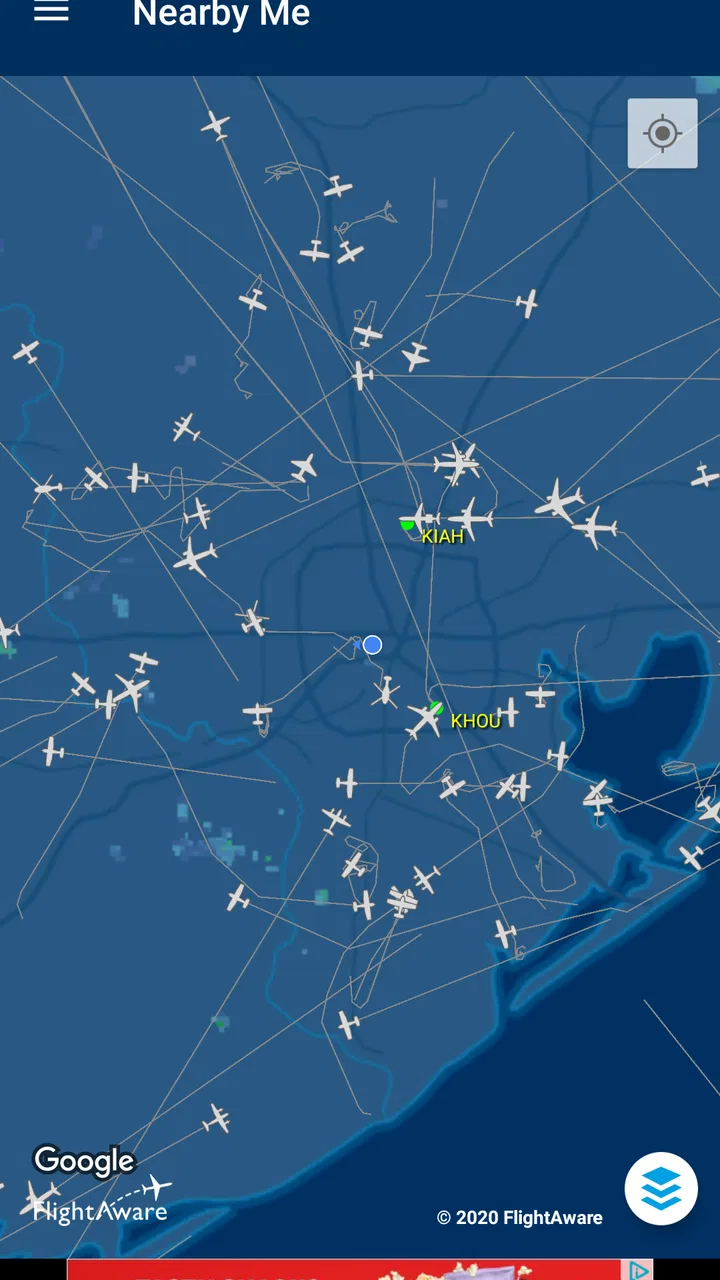
FlightAware Flight Tracker provides real-time flight tracking, allowing users to view live flight maps and detailed tracking data. The app includes features like airport delays, weather maps, and flight status notifications. Users can also view historical flight data and receive alerts about changes in flight schedules.
02Is the FlightAware Flight Tracker app free to use?
Yes, the basic version of FlightAware Flight Tracker is free and offers essential features such as real-time flight tracking and flight status updates. However, there is a premium version available through in-app purchases that provides additional features like advanced tracking tools and ad-free usage.
03Does FlightAware Flight Tracker require an internet connection to function?
Yes, an internet connection is necessary to access real-time flight data and updates. The app relies on live data feeds to provide accurate flight information, so users need either a Wi-Fi connection or mobile data to use the app effectively. Offline features are limited.
04How accurate is the flight tracking information provided by FlightAware?
FlightAware is known for providing highly accurate and reliable flight tracking information. It sources data from a network of ADS-B receivers, air traffic control systems, and airlines. However, slight delays or discrepancies can occur due to the nature of live data feeds and external factors like weather conditions.
05Can I track international flights with FlightAware Flight Tracker?
Yes, FlightAware Flight Tracker allows users to track both domestic and international flights. The app offers global coverage, enabling users to monitor flights worldwide. However, the level of detail and availability of certain features might vary depending on the region and airline partnerships.
Pros
- Real-time flight tracking updates.
- Comprehensive flight data available.
- Intuitive and user-friendly interface.
- Customizable alerts for flight changes.
- Global flight coverage and insights.
Cons
- Premium features require a subscription.
- Occasional delays in data updates.
- Ads can be intrusive in free version.
- Relies on consistent internet connection.
- Some features may overwhelm casual users.

FlightAware Flight Tracker
Gallery